In addition to providing services and protocols for the transmission of process data and the configuration of devices, the operation of a distributed system over a network requires functions for controlling and monitoring the communication status of the individual network nodes. As data transmission from CANopen devices is, in many cases, event-driven, continuous monitoring of communication with the network nodes is also required. CANopen provides so-called “Network Management” services and protocols for these tasks, namely:
- Control of the communication status of the network nodes and
- Node monitoring.
Status of a CANopen network node and control of the status
CANopen describes the communication status of a network node in a state diagram. By sending specific CAN messages – NMT messages – the CANopen network Master can control the communication status of the other nodes – the network management slaves – in a CANopen network. The CANopen Master can change the status of all nodes or of an individual node with a single command. NMT messages are sent with the highest-priority message ID, namely CAN-ID 0. The data field consists of just two bytes: the desired state – Target State – is encoded in the first data byte, whilst the second data byte contains the number of the node whose communication state is to be changed. All CANopen nodes in a network are addressed simultaneously via the (virtual) node ID 0. This allows, for example, all nodes to be set simultaneously to the “Operational” state so that the operational state commences simultaneously.
Node states and state changes
A CANopen node has various states for start-up, configuration and operation.
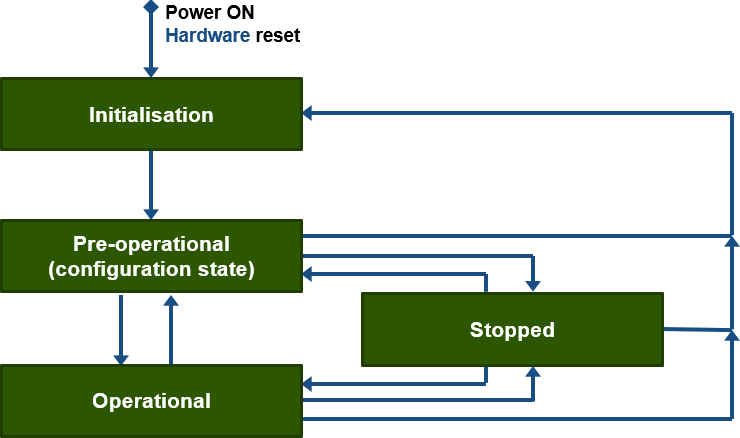


Initialisation state
To enable a partial reset of a specific node, this state is divided into three sub-states: ‘Reset-Application’, ‘Reset-Communication’ and ‘Initialise’. Following a hardware reset or power-on, a node enters the ‘Initialise’ state. Once the basic node initialisation (e.g. microcontroller, peripherals, CAN controller, software, etc.) is complete, the node transmits the so-called “Boot-up Message” (start-up message) and automatically switches to the “Pre-operational” state.
In the sub-state ‘Reset-Application’, the manufacturer-specific parameters and the standard device profile are reset to their Power-On values. This corresponds to the last saved values. The node then changes its sub-state to ‘Reset-Communication’.
In the sub-state “Reset-Communication”, the parameters of the communication profile are reset to their power-on values. The node then changes its state to “Initialise”.
Pre-operational state
This mode is primarily intended for configuring CANopen devices by populating the Object Directory. All necessary items in the Object Directory can be accessed via ‘service data objects’ (SDO). For example, a configuration tool can modify a device’s Object Directory by means of an SDO message. Some parts of the Object Directory – such as PDO administration – can only be written to if the node is in the pre-operational phase.
It will be clear, therefore, that the exchange of process data (via PDOs) is not possible in this state. However, in addition to communication via SDO messages, CANopen emergency calls, synchronisation, timestamp and, of course, NMT messages can also be sent or received in this state. By sending a “start-Remote-Node” message, a node switches to the “operational” state.Operational state
This is the normal operating state. In this state, the transmission of process data via so-called “process data objects” (PDOs) is possible.
Stopped
With the exception of node monitoring or heartbeat messages, a CANopen node cannot send or receive anything in this state.