CANopen® is a higher-level protocol for distributed industrial automation systems based on CAN. CANopen was developed within the CAN-in-Automation® (=CiA) group of users and manufacturers. It has been standardised as CENELEC EN 50325-4. Shortly after its publication, CANopen gained widespread acceptance, particularly in Europe, where the system can be regarded as the leading standard for CAN-based industrial and embedded system solutions.
Devices (nodes)
The basis of CANopen consists of independently functioning devices, also known as nodes, which are connected to the CAN bus. These devices are often specific actuators (motor drivers, inverters, general output) and sensors (encoders, sensors). These devices have been assigned a unique number, known as the Node ID. Thanks to this unique Node Id, every device on the bus can be recognised or addressed individually if required. A Node Id is assigned once and permanently stored within the device in question. This can be done using DIP switches, for example, but may also be programmed into EEPROM.
CANopen allows for a maximum of 127 nodes, numbered from Node ID 1 to 127. The allocation of IDs to devices is entirely flexible. For example, if a system consists of three devices, they may be assigned the arbitrary IDs #4, #53 and #68.
All CANopen devices have the same (software) structure, consisting of:
- Application
- Object Directory
- Communication and messages
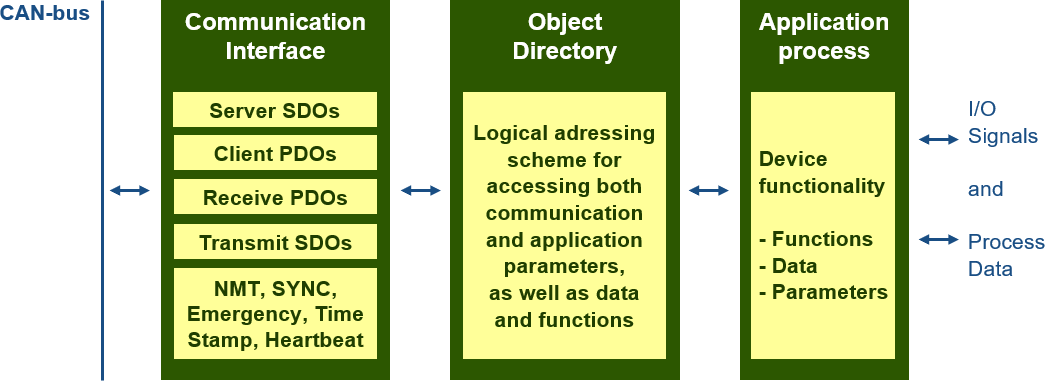


Application
The application forms the heart of a CANopen node; it contains the typical functionality of the device in question. This typical functionality is defined in a Communication Profile, which forms the basis of CANopen. All profiles together form a profile family. This specifies the basic communication mechanisms and a number of different Device or Application Profiles which describe the main types of connected equipment. Examples include digital and analogue I/O modules, (motor) drivers, programmable controllers or encoders. These device profiles specify functionality, parameters and access to data processing. Based on these standard profiles, access to the same type of equipment from different manufacturers can be achieved in exactly the same way. For example, all stepper motor controllers essentially have the same control scheme. This results in a high degree of independence from the manufacturer in question, and modules from different suppliers can easily be combined or interchanged.
Object Directory
At the heart of the CANopen standard is the description of device functionality using what is known as an Object Directory (OD). Each entry in the OD provides a basis for standardised network access to both ‘application objects’ – such as input and output signals, device parameters, device functions or network variables of a device – and to ‘communication objects’ that describe the device’s communication functionality. In this way, the properties of devices can be described and configured.
Communication and messages
Just like other well-known fieldbus systems, CANopen distinguishes between two basic data transmission mechanisms: the high-speed exchange of small portions of process data via so-called ‘Process Data Objects’ (PDOs), and access to the data in the OD via so-called ‘Service Data Objects’ (SDOs). PDOs are triggered by an event, are cyclical, or are requested as transmission objects without additional protocol overhead. A PDO can be used to transmit up to 8 bytes of data. In combination with a synchronisation message, the transmission and reception of PDOs can be synchronised across the entire network (“Synchronous PDOs”). The assignment of application objects to a PDO (Transmission Object) can be customised within the Object Directory using data structures (“PDO Mapping”). In addition to this standard communication, CANopen also provides for high-priority “emergency calls”. These can be used to report a device malfunction. A central and common system time is provided by a ‘central timing’ message. Furthermore, CANopen offers management functionalities such as checking and monitoring the communication status of the nodes.